iPhone penuh memori adalah masalah klasik yang bikin frustasi semua pengguna Apple. Apalagi kalau lagi mau foto atau download app baru, eh malah muncul notifikasi “Storage Almost Full” yang bikin mood langsung drop. Padahal rasanya baru kemarin beli iPhone dengan storage yang “cukup besar”, tapi entah kenapa cepet banget penuhnya.
Yang bikin tambah kesel, harga upgrade storage iPhone itu mahal banget, jadi kebanyakan orang terpaksa pake storage seadanya sambil struggle manage space yang ada. Tapi tenang, ada banyak cara clever buat free up storage tanpa harus sacrifice foto-foto penting atau app favorit lo.
Gue udah compile 10 cara paling effective buat deal with iPhone storage issues berdasarkan pengalaman pribadi dan research mendalam. Tips-tips ini proven work dan bisa immediately free up significant storage space. No need jadi tech expert, semua bisa dilakukan dalam hitungan menit!
Optimize iPhone Photos dengan Smart Storage Management
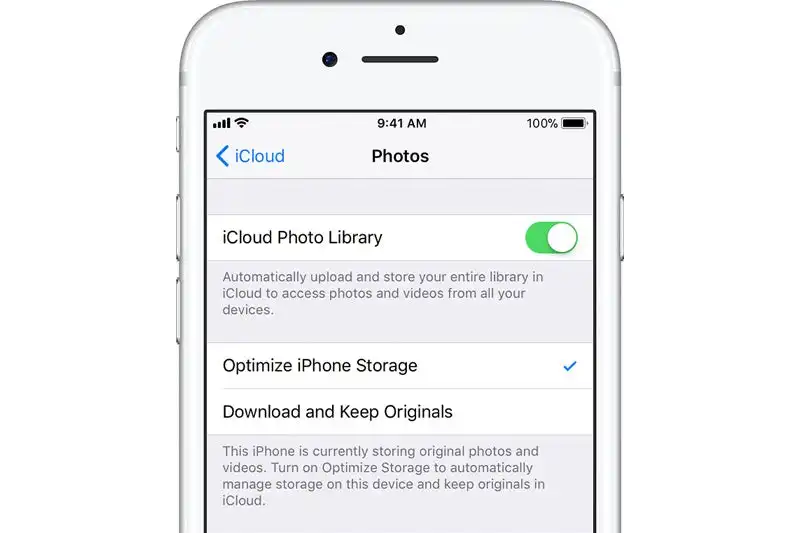
Salah satu penyebab utama iPhone cepat penuh adalah photo library yang nggak ter-manage dengan baik. Apple Photos app punya fitur “Optimize iPhone Storage” yang automatically replace full-resolution photos dengan smaller versions di device lo, while keeping originals di iCloud.
Buka Settings > Photos > Optimize iPhone Storage. This feature bisa save gigabytes of space instantly tanpa completely lose access ke photos lo. Full-resolution versions masih bisa di-download on-demand kalau lo butuh edit atau share dengan quality tinggi.
Selain itu, regularly review dan delete duplicate photos, screenshots yang nggak penting, atau Live Photos yang consume extra space. Use built-in “Recently Deleted” album cleanup juga penting karena deleted photos masih occupy space selama 30 hari.
Pro tip: Enable iCloud Photos backup terus optimize storage setting. This way lo nggak lose photos tapi significant space freed up di local storage.
Clear Cache dan Data Apps untuk Free Up iPhone Space
Apps accumulate cache, temporary files, dan user data over time yang bisa consume substantial storage. Different from Android, iOS nggak punya universal cache clear option, jadi harus handle per-app atau use alternative methods.
Check storage usage per app di Settings > General > iPhone Storage. Apps kayak social media, streaming services, atau games often accumulate large amounts of cached data. For apps yang show significant “Documents & Data” usage, consider delete dan reinstall app.
Some apps like WhatsApp, Telegram, atau messaging apps store media files yang bisa manually deleted. Go through chat histories dan delete old media files, voice messages, atau documents yang nggak diperlukan lagi.
Streaming apps like Netflix, Disney+, atau Spotify also cache content for offline viewing. Check app settings dan clear downloaded content yang udah nggak ditonton atau didengar.
Manage iPhone Messages dan Attachments Storage
Messages app bisa jadi silent storage killer, especially kalau lo active di group chats atau sering share media via iMessage. Years of conversation history dengan photos, videos, voice messages, dan GIFs bisa accumulate ke several gigabytes.
Buka Settings > Messages > Message History dan set “Keep Messages” ke 30 days atau 1 year instead of forever. This automatically delete old messages dan attachments, freeing up significant space over time.
For immediate relief, manually go through message conversations dan delete media-heavy threads. Long-press specific messages dengan attachments dan select delete option. Focus on group chats atau conversations dengan banyak shared media.
Also check “Large Attachments” section di iPhone Storage settings yang specifically show biggest files attached di Messages app. Delete yang nggak diperlukan untuk instant space recovery.
Utilize iCloud Storage untuk Offload iPhone Data
iCloud storage adalah most seamless way buat extend iPhone storage capacity tanpa physical upgrade. Many users underutilize this feature karena nggak fully understand optimization options yang available.
Enable iCloud backup untuk Photos, Messages, App Data, dan other content. Then use “Offload Unused Apps” feature yang automatically remove apps yang jarang dipake while keeping data dan settings intact. Apps bisa easily reinstalled when needed.
iCloud Drive juga bisa store documents, PDFs, dan other files yang biasa disimpan di iPhone local storage. Move files dari local storage ke iCloud Drive untuk free up immediate space.
Consider upgrade iCloud storage plan kalau 5GB free storage nggak cukup. Monthly cost relatively affordable compared to buying iPhone dengan storage capacity yang lebih besar.
Delete Unnecessary Apps dan Games untuk iPhone Storage Relief
Regularly audit installed apps dan ruthlessly delete yang nggak dipake. Many users have dozens of apps yang di-download impulse tapi never actually used regularly. Each app, especially games, bisa consume hundreds of MBs atau even GBs.
Use “Last Used” information di iPhone Storage settings untuk identify apps yang nggak dibuka dalam weeks atau months. These are prime candidates for deletion. Don’t worry about losing progress di games – most modern games sync data ke cloud.
Focus pada large apps first untuk maximum impact. Games, video editing apps, atau professional apps often consume most space. If lo nggak use regularly, better delete dan reinstall when needed.
Also check for duplicate apps atau alternative apps yang serve same function. Keep only the best one dan delete redundant alternatives untuk optimize storage usage.
Clean iPhone Downloads dan Files App
Downloads folder dan Files app often become digital dumping ground untuk PDFs, documents, images, dan other files yang download over time. Many users forget these files exist dan they quietly consume storage space.
Open Files app dan thoroughly go through Downloads, iCloud Drive, dan other locations where files accumulate. Delete old documents, duplicate files, atau anything yang nggak diperlukan lagi.
Pay attention ke file sizes – video files, high-resolution images, atau large PDFs should be prioritized for deletion atau move ke external storage solutions.
Regular maintenance di Files app should be part of iPhone storage management routine, similar to cleaning computer hard drive.
Manage iPhone Music dan Media Downloads
Apple Music, Spotify, podcast apps, dan other media services often cache atau allow offline downloads yang consume significant storage. If lo stream music instead of storing locally, these cached files bisa safely deleted.
For Apple Music users, go to Settings > Music dan check “Downloaded Music” usage. Delete playlists atau songs yang di-download for offline listening tapi nggak regularly played.
Podcast apps also accumulate episode downloads over time. Check app settings dan set automatic deletion for played episodes atau manually delete old episodes yang nggak akan didengar lagi.
Video streaming apps like YouTube Premium atau Netflix also allow offline downloads. Review dan delete downloaded videos yang udah ditonton untuk immediate storage relief.
Optimize iPhone System Storage dan Updates
iOS system itself dan cached system data bisa consume unexpected amounts of storage. “System” storage yang ditampilkan di iPhone Storage sometimes inflated karena temporary files atau cached data yang nggak properly cleared.
Restart iPhone regularly untuk clear temporary system files dan RAM. This simple action often free up several hundred MBs of system storage yang stuck di cache.
Keep iOS updated ke latest version karena newer versions often include storage optimization improvements dan bug fixes yang resolve storage management issues.
If “System” storage abnormally large (over 15-20GB), consider backup dan restore iPhone untuk reset system storage allocation. This nuclear option but effective for resolving persistent system storage bloat.
Use Third-Party Storage Management Tools
While iOS restrictive tentang third-party access, ada some legitimate tools yang bisa help identify storage usage patterns dan suggest optimization strategies. Apps like DiskSight atau System Activity Monitor provide detailed breakdown of storage usage.
These tools help identify which file types consuming most space dan provide insights yang nggak available di native iOS storage management. Use information untuk make informed decisions about what to delete atau optimize.
However, be cautious dengan third-party cleaner apps yang promise automatic cleaning. Many of these apps ineffective di iOS karena system restrictions dan some potentially harmful atau misleading.
Focus pada tools yang provide information rather than automatic cleaning functionality untuk safer storage management approach.
Emergency iPhone Storage Solutions
When facing critical storage shortage dan need immediate space, ada several emergency tactics yang bisa quickly free up substantial storage. These methods more aggressive tapi effective untuk urgent situations.
Force close all running apps dan restart iPhone untuk clear RAM dan temporary files. Delete large apps yang bisa easily reinstalled later, prioritizing games atau media apps dengan biggest storage footprint.
Temporarily disable iCloud Photos sync dan manually delete recent photos/videos yang bisa recovered from recently deleted album if needed. This dramatic step tapi bisa immediately free up several GBs.
Use “Offload All Unused Apps” option di iPhone Storage settings untuk automatic removal of rarely used apps while preserving data. This middle-ground solution yang balance accessibility dengan storage relief.
Kesimpulan: Maintain iPhone Storage Health Long-term
Managing iPhone storage adalah ongoing process yang butuh regular attention dan maintenance. With proper habits dan utilization of built-in optimization features, even lower-capacity iPhone models bisa remain functional dan efficient.
Key adalah proactive management rather than reactive cleaning when storage full. Set monthly reminder untuk review storage usage, clean unnecessary files, dan optimize app usage patterns.
Remember, storage management bukan cuma tentang deleting files, tapi juga about optimizing how lo use iPhone dan leverage cloud services untuk extend effective storage capacity.
Implement tips-tips ini secara consistent dan iPhone lo bakal always have adequate storage untuk daily needs tanpa constant worry about running out of space!
About The Author